
 DevPixel Engineering
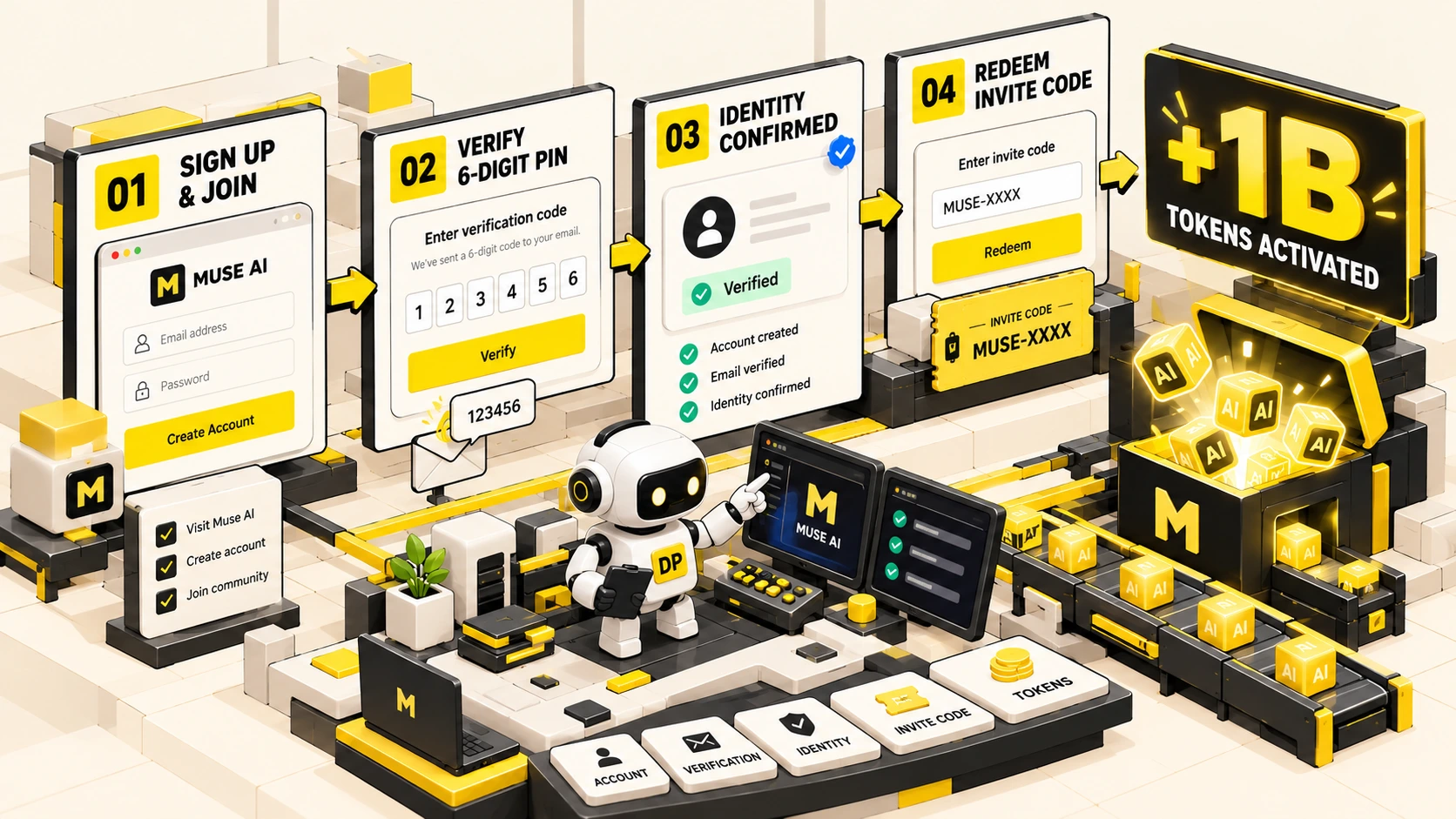
Recently, the AI and developer community has been buzzing about creating a Muse AI account to claim billions of free promotional tokens. Unlike conventional conversational chatbots, Muse AI is Meta’s next-generation personal AI Agent developed by Meta AI, capable of browsing the web, completing forms, and executing complex workflows inside an isolated virtual machine environment.
If you want to experience this bleeding-edge autonomous AI technology but are unsure how to sign up or find yourself blocked by waitlist queues, this step-by-step tutorial will guide you through registration, regional bypass techniques, token code redemption, and secure usage best practices, along with insights on managing token budget caps for AI agents.
Meta’s free token allocation operates on an invite-referral system. Each newly registered user who redeems a valid invite code receives 1 billion tokens within their first 48 hours. By sharing your personal code with colleagues or friends, you accumulate an additional 1 billion tokens per referral, unlocking milestones up to 4 billion tokens or more.
1. Prerequisites Before Registering
Ensure you have the following ready before starting the onboarding process:
- Active Email Address: A standard personal email that has never been registered with Muse AI before.
- Meta / Instagram Account: Used for streamlined identity verification to confirm you are a human user.
- Network Utilities (If needed): Because Meta is conducting rolling regional previews, users in unlisted countries may require a reputable VPN (connected to US or Canada nodes) or a browser-enabled ChatGPT workspace.
- Valid Invite Code: Have a community invite code ready to unlock your initial token bonus.
2. Step-by-Step Registration Guide
Step 1: Access the Official Portal (Bypassing Waitlists)
Navigate to the official onboarding portal at: https://muse.ai/join.
Troubleshooting Waitlist Prompts:
- Method 1 (VPN Tunneling): Enable your VPN set to the United States or Canada, open an incognito/private browsing window, and reload the link.
- Method 2 (ChatGPT Work Bypass): If you have access to ChatGPT Work with web control capabilities, start a session and prompt:
Open https://muse.ai/join and grant browser control permissions. The headless sandbox will bypass regional IP filters directly.
Step 2: Enter Credentials and Verify PIN
- On the landing page, enter your email address and click Continue.
- Check your inbox for a verification email from Muse AI containing a 6-digit confirmation PIN (inspect your Spam folder if it does not arrive promptly).
- Enter the PIN on the screen to confirm ownership of the email.
Step 3: Identity Verification
To eliminate automated bot manipulation, Muse enforces an identity verification gate:
- Option 1 (Recommended): Sign in via your active Meta (Facebook or Instagram) profile. This instantly verifies your user status without financial input.
- Option 2: International card pre-authorization (Visa/Mastercard). A micro-hold is temporarily placed and immediately reversed. Ensure you are exclusively on the official domain muse.ai before proceeding.
Step 4: Redeem Your Invite Code for 1 Billion Free Tokens
Once inside your main Muse workspace dashboard, redeem your promotional code immediately:
- Navigate to Settings and click the General tab.
- Locate the Redeem invite code input field.
- Paste a valid invite code and click Confirm.
- Your account balance will instantly reflect the addition of 1,000,000,000 promotional tokens.
3. How to Obtain Your Own Referral Code to Reach 4 Billion Tokens
To scale your token balance up to the 4 billion token tier popularized on social feeds, generate your own referral link:
- Navigate to the Invite Friends section on your dashboard.
- Copy your unique 6-character referral code (e.g.,
BO7M79,EYAEAZ). - Share the code with colleagues. Each successful redemption earns both parties 1 billion tokens, compounding your total available computing allocation.
4. Putting Muse AI to Work: Practical Use Cases
With tokens loaded, you can task your agent with autonomous browser workflows similar to our automated engineering workflows with AI:
Prompt: “Visit 3 major competitor pricing pages, extract feature matrices, and export a clean comparison table in Markdown.” The agent handles browser navigation and data aggregation autonomously.
Prompt: “Navigate to the vendor onboarding portal and populate company details from this document.” The agent inspects form inputs and populates fields accurately.
5. Crucial Safety & Operational Reminders
- 48-Hour Deadline: The invite code redemption field locks exactly 48 hours after account creation. Ensure you redeem your code immediately upon signing up.
- Phishing Awareness: Strictly register on
muse.ai. Never follow obfuscated shortlinks found in unmoderated comment sections. - Permission Scoping: While the agent runs inside a sandboxed virtual machine, never grant it access to corporate email accounts with proprietary credentials.
6. Frequently Asked Questions (FAQ)
How many tokens do I get when redeeming an invite code?
New accounts receive exactly 1 billion tokens upon redeeming a valid invite code. To reach the 4 billion token milestone, you must share your unique code with 3 additional users.
How long is the redemption window active?
The invite redemption field remains accessible for 48 hours following account creation. After 48 hours, the option is permanently locked.
Conclusion
Meta’s Muse AI is an impressive milestone in practical autonomous agent deployment. By following this guide, you can bypass regional waitlists, claim your promotional tokens securely, and start experimenting with automated browser workflows today.
Chưa có bình luận nào. Hãy là người đầu tiên chia sẻ góc nhìn!