1. Overview: What Is Gemini Omni and How to Access It via Google Flow
Gemini Omni is Google’s leap forward in next-generation AI video generation technology: concurrently processing multiple modalities from text, static images, and storyboards to audio to generate seamless videos with cinematic realism.
An important note: Gemini Omni does not run on the standard gemini.google.com interface. This tool is integrated exclusively within the Google Flow professional workspace (flow.google.com), where you can organize projects, manage timelines, and fine-tune each frame.
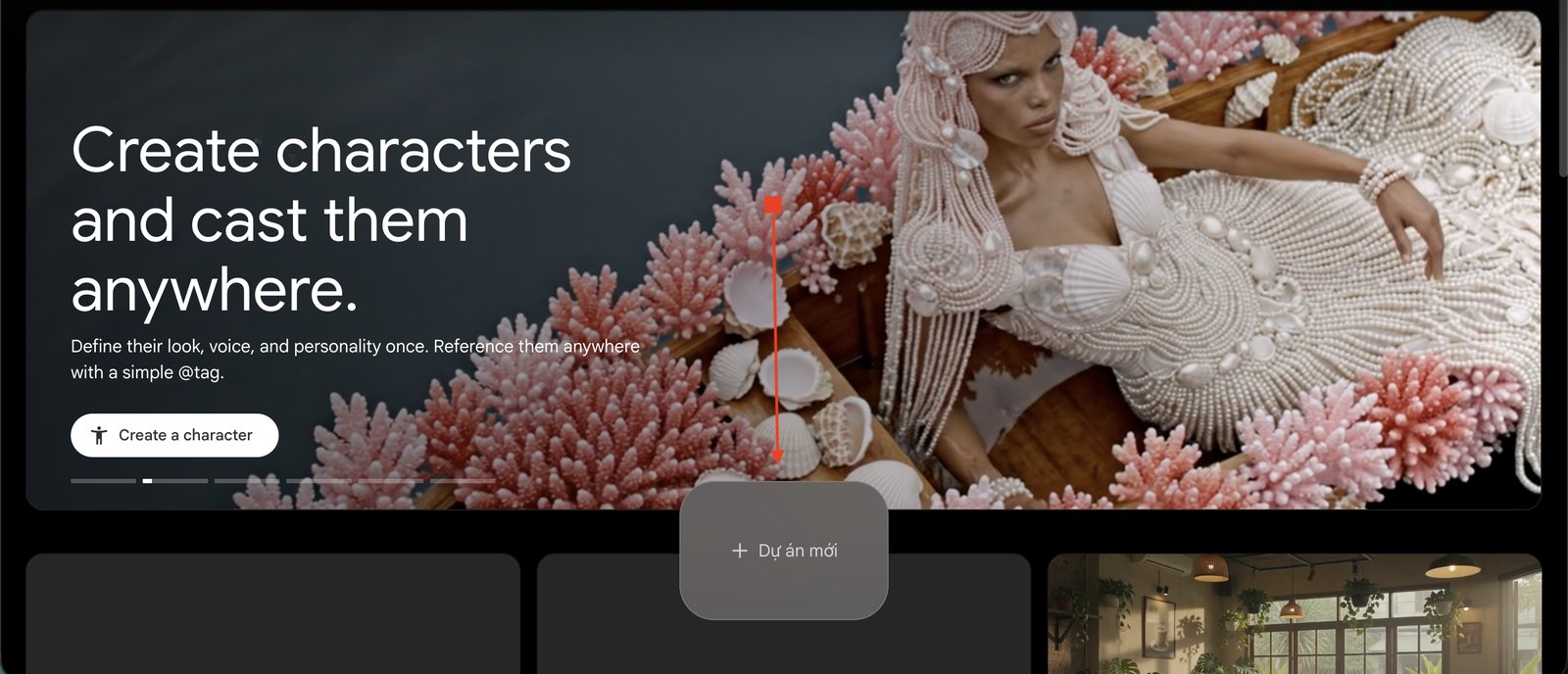
CREDIT MANAGEMENT & COSTS
AI video generation consumes a significant amount of computing credits. With the Pro plan, on average, after every 3 to 5 high-quality video generations, you will need a cooldown period for credit regeneration. Carefully prepare your scripts and prompts before clicking the generate video button.
2. Technique 1: Generating Video from Text Prompts with Cinematic Motion
Writing prompts for video is completely different from writing prompts for static images in Midjourney. You not only describe the subjects, but you must also define the camera movement trajectory (camera angle, pan, zoom, dolly) and the pacing of the character’s actions.
A complete video prompt structure consists of 4 layers: [Camera Angle/Shot Type] + [Subject and Action] + [Lighting and Environment] + [Style and Texture].
Bustling Saigon street at dusk. Motorbikes, vibrant neon signs reflecting on the wet asphalt after rain.
Camera slowly pans up from the ground to a pedestrian's eye level, capturing the dynamic rhythm of life and elongated vehicle light trails.
Warm lighting blended with cinematic neon blue tones, shallow depth of field, 4K 60fps.
3. Technique 2: Image-to-Video & Fine-Tuning via Conversational Chat
The most outstanding advantage of Gemini Omni compared to older tools is its capability for fine-tuning through natural conversation. Instead of having to delete and rewrite the entire prompt every time the result isn’t satisfactory, you can chat directly with the AI to request local adjustments.
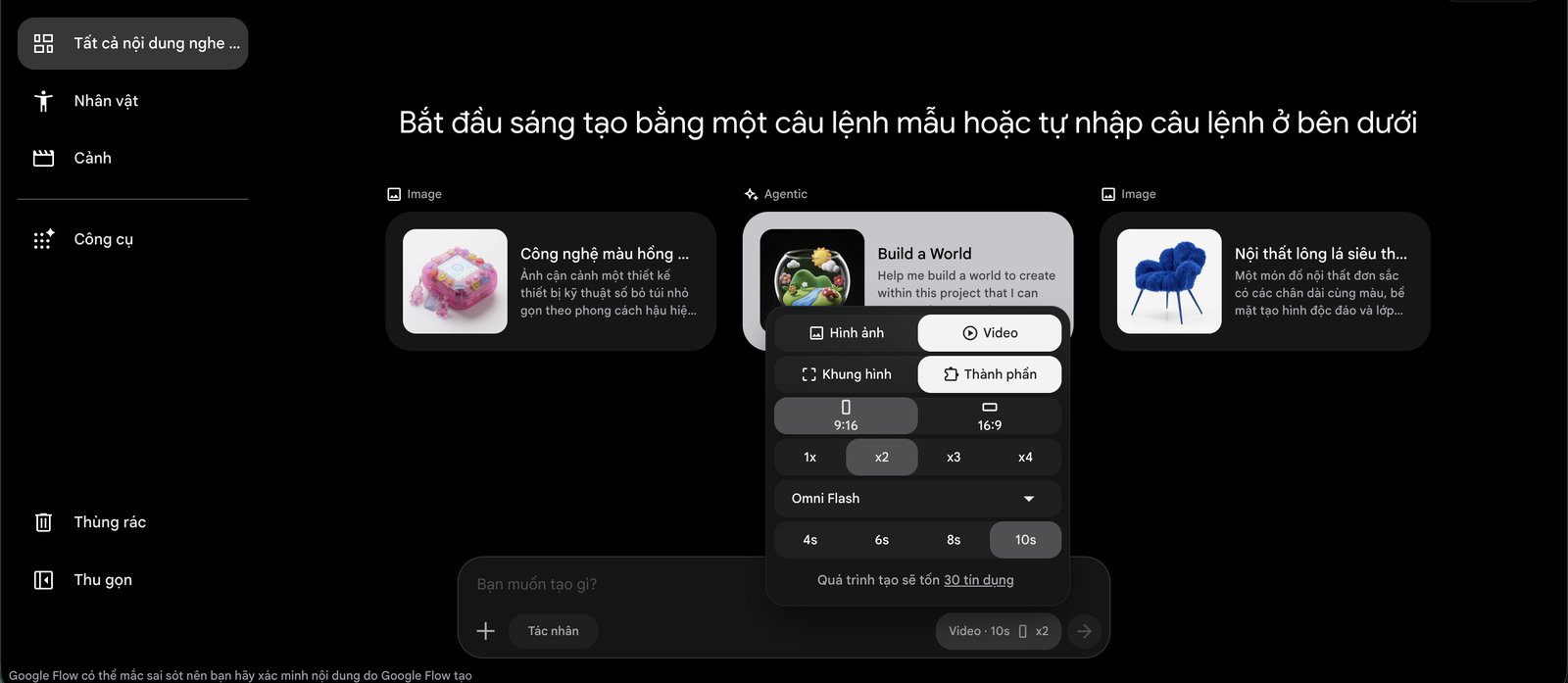
Sample conversational adjustment prompts after generating the initial video:
- “Keep the character and background unchanged, increase the character’s walking speed by 30%.”
- “Change the camera angle to an over-the-shoulder shot and make the afternoon lighting warmer.”
- “Remove the pedestrians in the background to focus attention on the product on the table.”
4. Technique 3: Creating Long Videos from Multi-Scene Storyboards
When you want to tell a complete 30- to 60-second story, the biggest pitfall is uploading all 6 storyboard panels at once and expecting the AI to generate it in one go. The AI will experience context overload and fracture the motion continuity.
Field-Tested Tip: Break down the storyboard into consecutive scene pairs (Panel 1 to Panel 2), generate each 5- to 8-second segment individually, and then stitch them together on the Google Flow timeline.
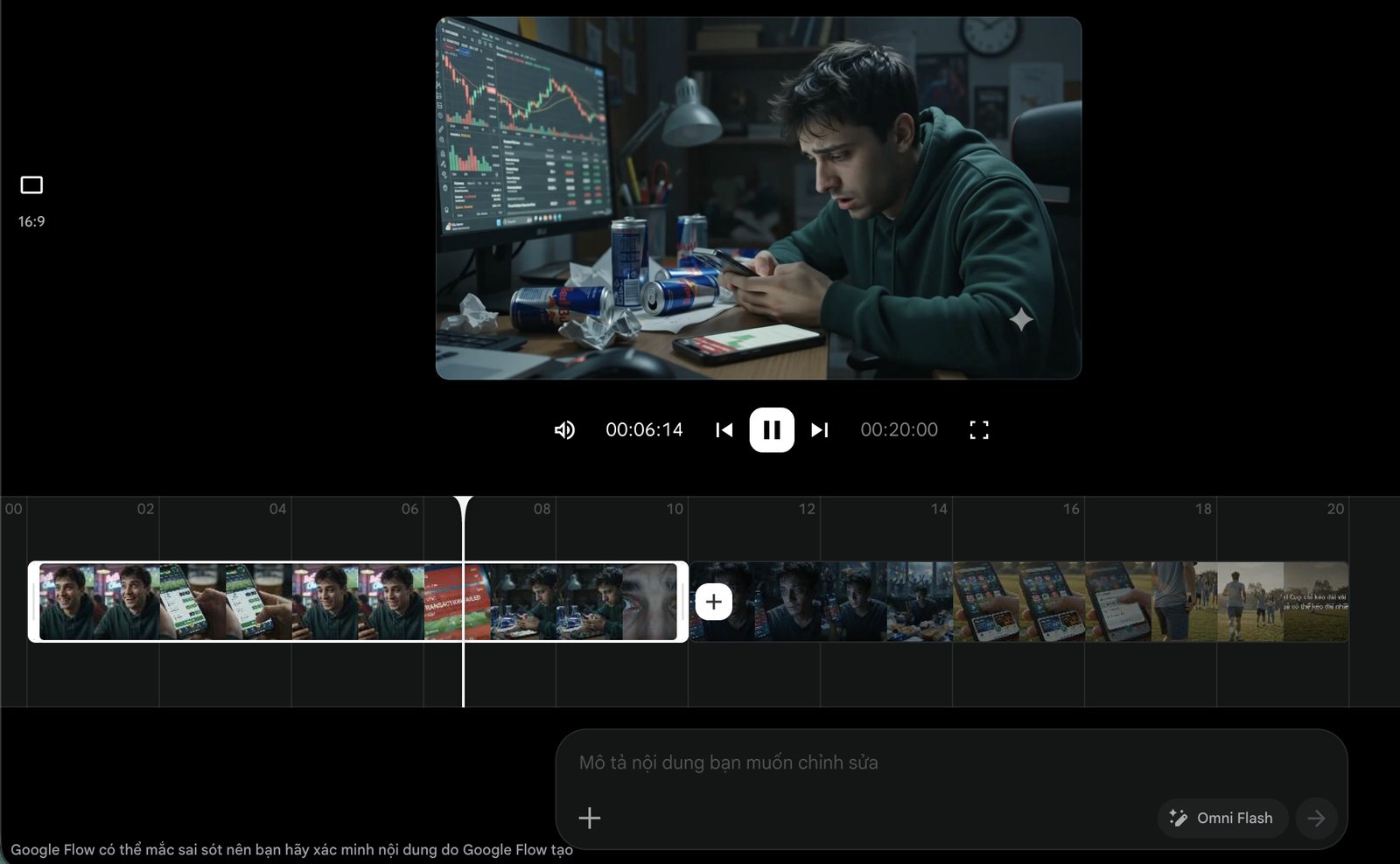
Cinematic medium shot in a bustling football cafe. A 25-year-old young man with bright eyes stares at his phone screen, beaming with a radiant smile after winning a football bet.
Warm ambient lighting from decorative lamps, friends around him patting his shoulder in congratulations, camera panning smoothly around the table.
A tense, fast montage sequence. The clock strikes 3 AM; flickering red and blue light from a phone screen casts across the gaunt face and deep eye circles of the young man in a dark rented room.
Consecutive sounds of bank deduction notifications; a subtle handheld camera shake creates a suffocating tension.
Wide angle slow dolly-out in a desolate, empty room. The young man sits hugging his knees in the corner of the wall, a shattered phone screen lying on the cold floor.
Faint moonlight filters through the gaps in the curtains, gloomy cold color tones, an atmosphere of absolute loneliness.
Low-angle slow-motion shot under the warm dawn sunlight. The young man stands up, opening the window wide to embrace the fresh breeze as the sunlight illuminates his determined face.
Color tone transitions from cold gray to vibrant golden-orange; the camera tilts up toward the sky, symbolizing rebirth and hope.
5. Technique 4: Controlling Character Consistency
Character Drift is the number one headache for AI filmmakers: the exact same character has black hair and a dress shirt in scene 1, but turns into brown hair and a t-shirt in scene 2. To maintain absolute consistency in Gemini Omni:
- Fix the identity profile: Always attach a facial Reference Image in every scene generation prompt.
- Lock detailed costume descriptions: Do not write a generic “young man”, but write “a 25-year-old Asian man, glossy black 7/3 side-part hair, wearing a plain black crew-neck t-shirt and a silver-strap watch on his left wrist”.
- Ideal shot duration: Keep each clip under 6 seconds so the model preserves facial structure without distortion.
6. Technique 5: Producing High-Converting UGC Video Ads
Vertical 9:16 UGC (User-Generated Content) videos on TikTok and Reels are currently a marketing goldmine. Gemini Omni enables you to create authentic review clips that look as though they were shot with an iPhone front camera.
Vertical 9:16 UGC video, 10 seconds, filmed with a smartphone front-facing camera at an outdoor cafe.
A stylish, energetic young woman wearing matte white wireless noise-canceling headphones, smiling and nodding along to the music.
She gently taps the headphone to activate noise cancellation; ambient sounds instantly fade out, and her facial expression shifts to pleasant surprise.
Natural daylight, subtle natural handheld camera shake, 100% authentic skin texture without artificial smoothing filters.
Close-up POV shot. A young woman in a bright modern kitchen drops a colorful laundry detergent pod into a transparent washing machine drum.
Water splashes smoothly in slow motion, rich bubbles forming quickly.
Clean cinematic commercial lighting, 4K resolution, vivid colors.
[Upload 1 photo of a model wearing a designer dress]
Generate a video of the model walking confidently on the red carpet at an evening fashion event.
The silk evening gown moves gracefully with each stride, camera flashes blinking from both sides of the audience.
Low-angle camera shot tracking closely with each step, showcasing an elegant and luxurious demeanor.
A cute 3D cartoon boba milk tea cup character in Pixar style, with big round sparkling eyes and rosy cheeks.
The boba cup hops around playfully on a desk, with tapioca pearls sloshing and bouncing inside the transparent cup.
Bright studio lighting, warm pastel colors, soft shadows.
7. Comparison Table: Gemini Omni vs. Leading AI Video Tools
⇄ Swipe horizontally to view full table
| Technical Criteria |
Gemini Omni (Google Flow) |
OpenAI Sora |
Runway Gen-3 / Kling AI |
| Conversational Editing |
Extremely strong support via Chat |
Limited |
Requires rewriting prompt from scratch |
| Storyboard Sequencing |
Built-in Flow Timeline |
Requires external editing tools |
Generates individual clips separately |
| Motion Physics |
Very smooth, natural |
Most accurate on the market |
Occasional perspective distortion |
| Clip Render Speed |
1 to 2 minutes for 5 seconds |
Long queue wait times |
3 to 5 minutes |
8. Frequently Asked Questions & Troubleshooting (FAQ)
A compilation of common questions and real-world tips for producing videos with Gemini Omni:
How do I sign up for an account to try Gemini Omni on Google Flow?
▼
You need to visit flow.google.com using a Google Workspace account or a personal Google account that has been registered for the Google Labs/AI Test Kitchen waitlist. Certain regions may require a US IP address for initial feature activation.
Are videos generated by Gemini Omni watermarked?
▼
All videos exported from the Google AI ecosystem are embedded with an invisible SynthID digital watermark to identify AI-generated content. Free tier exports may include a small corner logo, whereas enterprise accounts can export clean, high-resolution video.
What is the maximum duration of a single video clip generated by Gemini Omni?
▼
Each single generation run supports a duration of 4 to 10 seconds. To produce longer videos (from 30 seconds to several minutes), use the Extend Video feature or stitch multiple scenes together directly on the Google Flow timeline.
Why do character faces often become distorted during rapid camera pans?
▼
This is a common issue when aggressive physical motion exceeds the frame interpolation capabilities. Slow down the camera movement in your prompt (use keywords like smooth slow-pan or gentle tracking) and anchor a fixed reference portrait.
Does Gemini Omni automatically generate audio and lip-synced voiceovers?
▼
The system is capable of automatically generating ambient sound effects (SFX) and basic background music that match the video’s context. However, for detailed dialogue voiceovers, you should use specialized tools like ElevenLabs to achieve the highest pronunciation quality.
Can I download the exported videos to run ads on Facebook and TikTok?
▼
Absolutely. You can select standard aspect ratios of 9:16 (vertical for TikTok, Reels) or 16:9 (horizontal for YouTube) before clicking generate, making them ready to import into Ads Manager.
How are Google Flow credit costs allocated?
▼
Trial accounts receive a certain amount of credits each day. Generating a 5-second video costs between 10 to 20 credits, depending on the resolution (720p or 1080p). Take advantage of the preview mode before exporting the final file.
Do Vietnamese prompts yield video generation results as accurate as English?
▼
Gemini Omni understands Vietnamese very well in terms of semantics and local context (such as Saigon streets, conical hats, ao dai). However, for technical cinematography terms (such as dolly-in, shallow depth of field, low-angle shot), combining English keywords will help ensure more accurate camera movements.
Read Next: Leveraging 3 Open-Source GitHub Tool Categories Optimized for Freelancers

 DevPixel Engineering
Chưa có bình luận nào. Hãy là người đầu tiên chia sẻ góc nhìn!